> For the complete documentation index, see [llms.txt](https://pyohamen.gitbook.io/til/llms.txt). Markdown versions of documentation pages are available by appending `.md` to page URLs; this page is available as [Markdown](https://pyohamen.gitbook.io/til/django/10_optimization.md).

# Optimization

### SQL문 실행

* Iteration
* Slicing
  * 기본적으론 x
  * step을 활용할 때에만
    * \[3:10:2]
* repr
* len
* bool

## Query 개선

### 필수 라이브러리 : [ django debug toolbar](https://django-debug-toolbar.readthedocs.io/en/latest/installation.html)

#### installation

```bash
$ pip install django-debug-toolbar
```

#### Prerequisites

> `settings.py`

```python
INSTALLED_APPS = [
    ...
    'debug_toolbar',
]
```

#### Setting up URLconf

> `urls.py` in the root directory

```python
from django.contrib import admin
from django.urls import path, include
from django.conf import settings
from django.conf.urls.static import static

if settings.DEBUG:
    import debug_toolbar
    urlpatterns = [
        path('__debug__/', include(debug_toobar.urls)),
        path('admin/', admin.site.urls),
        path('posts/', include('posts.urls')),
        path('accounts/', include('accounts.urls')),
    ] + static(settings.MEDIA_URL, document_root=settings.MEDIA_ROOT)
```

#### Enabling middleware

> `settings.py`

```python
MIDDLEWARE = [
    ...
    'debug_toolbar.middleware.DebugToolbarMiddleware',
    ...
]
```

#### Configuring Internal IPs

> `settings.py`

```python
INTERNAL_IPS = [
    ...
    '127.0.0.1',
    ...
]
```

### 0. 관련 문서

* **데이터베이스 최적화**

  : <https://docs.djangoproject.com/en/3.0/topics/db/optimization/>

  * QuerySet 실행에 관한 이해 : <https://docs.djangoproject.com/en/3.0/topics/db/optimization/#understand-queryset-evaluation>
    * lazy하여, evaluated 되는 시점에 실행되며, cache를 활용할 수 있음. (각각 문서 확인할 것)
  * **`count` , `exists`**
    * <https://docs.djangoproject.com/en/3.0/topics/db/optimization/#don-t-overuse-count-and-exists>
    * 일반적으로 활용하는 것이 좋으나, 예시의 코드의 상황에서는 cache된 값을 바탕으로 length를 구하는 방식으로 풀어나갈 수 있음
  * **`select_related`**

    : <https://docs.djangoproject.com/en/3.0/ref/models/querysets/#django.db.models.query.QuerySet.select_related>
  * **`prefetch_related`**

    : <https://docs.djangoproject.com/en/3.0/ref/models/querysets/#prefetch-related>

### 1. 댓글 수 출력 - `annotate()` 활용

> N+1 problem

#### 개선 전 (11번)

```python
# views.py
posts = Post.objects.order_by('-pk')
```

```markup
<p>댓글 수 : {{ aritcle.comment_set.count }}</p>
```

![image-20200504205530356](https://github.com/pyohamen/TIL/tree/c406d6f5d12dcc8f41be5a252583f3ed8e46c4a3/images/image-20200504205530356.png)

#### 개선 후 (1번)

```python
# views.py
Post.objects.annotate(comment_set_count=Count('comment')).order_by('-pk')
```

```markup
<!-- 주의! comment_set_count로 호출 -->
<p>댓글 수 : {{ post.comment_set_count }}</p>
```

![image-20200504205710572](https://github.com/pyohamen/TIL/tree/c406d6f5d12dcc8f41be5a252583f3ed8e46c4a3/images/image-20200504205710572.png)

### 2. 게시글 작성자 이름 출력 - `selected_related()` 활용

> `select_related`는 SQL JOIN을 통해 데이터를 가져온다
>
> 1:1, 1:N 관계에서 참조관계 (N -> 1, foreignkey가 정의되어 있는 곳)

#### 개선 전 (11번)

```python
# views.py
posts = Post.objects.order_by('-pk')
```

```markup
<h3>{{ article.user.username }}</h3>
```

![image-20200504210229746](https://github.com/pyohamen/TIL/tree/c406d6f5d12dcc8f41be5a252583f3ed8e46c4a3/images/image-20200504210229746.png)

#### 개선 후 (1번)

```python
# views.py
Post.objects.select_related('user').order_by('-pk')
```

```markup
<!-- 변경 없음 -->
<h3>{{ article.user.username }}</h3>
```

![image-20200504210339287](https://github.com/pyohamen/TIL/tree/c406d6f5d12dcc8f41be5a252583f3ed8e46c4a3/images/image-20200504210339287.png)

### 3. 게시글마다 댓글들 출력 - `prefetch_related()` 활용

> `prefetch_related`는 python을 통한 join으로 데이터를 가져온다
>
> M:N, 1:N 관계에서 역참조 관계 (1->N)

#### 개선 전 (11번)

```python
# views.py
posts = Post.objects.order_by('-pk')
```

```markup
{% for comment in post.comment_set.all %}
    <p>{{ comment.content }}</p>
{% endfor %}
```

![image-20200504210658055](https://github.com/pyohamen/TIL/tree/c406d6f5d12dcc8f41be5a252583f3ed8e46c4a3/images/image-20200504210658055.png)

#### 개선 후 (2번)

```python
posts = Post.objects.prefetch_related('comment_set').order_by('-pk')
```

```markup
<!-- 변경 없음 -->
{% for comment in article.comment_set.all %}
    <p>{{ comment.content }}</p>
{% endfor %}
```

![image-20200504210808430](https://github.com/pyohamen/TIL/tree/c406d6f5d12dcc8f41be5a252583f3ed8e46c4a3/images/image-20200504210808430.png)

### 4. 게시글마다 작성자 이름과 댓글들 출력

#### 개선 전 (111번)

```python
# views.py
posts = Post.objects.order_by('-pk')
```

```markup
{% for comment in article.comment_set.all %}
    <p>{{ comment.user.username }} : {{ comment.content }}</p>
{% endfor %}
```

![image-20200504211024275](https://github.com/pyohamen/TIL/tree/c406d6f5d12dcc8f41be5a252583f3ed8e46c4a3/images/image-20200504211024275.png)

#### 개선 후 (2번)

```python
# views.py
from django.db.models import Prefetch

posts = Post.objects.prefetch_related(
        Prefetch('comment_set'),
        queryset=Comment.objects.select_related('user')
    ).order_by('-pk')
```

```markup
{% for comment in article.comment_set.all %}
    <p>{{ comment.user.username }} : {{ comment.content }}</p>
{% endfor %}
```

![image-20200504211241178](https://github.com/pyohamen/TIL/tree/c406d6f5d12dcc8f41be5a252583f3ed8e46c4a3/images/image-20200504211241178.png)

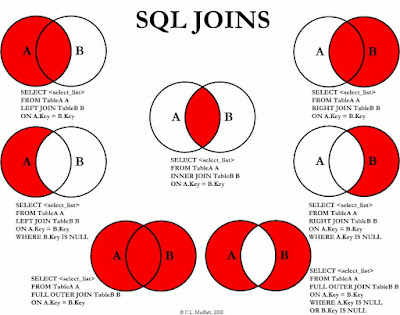
## SQL Join

![How to join three tables in SQL with MySQL database example](https://4.bp.blogspot.com/-_HsHikmChBI/VmQGJjLKgyI/AAAAAAAAEPw/JaLnV0bsbEo/s400/sql%2Bjoins%2Bguide%2Band%2Bsyntax.jpg)

ex)

```
-- 게시글(A) + 댓글(B)
SELECT * FROM article
LEFT OUTER JOIN comment
ON article.id = comment.article_id;

-- 게시글(A) + 사용자
SELECT * FROM article
INNER JOIN user
ON article.user_id = user.id;
```

`+`

## Gravata 활용하여 profile photo 설정하기

<https://en.gravatar.com/site/implement/>

### 방법 1) @property 설정

> accounts > models.py

```python
from django.db import models
from django.conf import settings
from django.contrib.auth.models import AbstractUser
import hashlib

# Create your models here.
# model은 필요없다! Django package에 있는 User를 사용할 것이기 때문!

# 사용자 정의 모델 만들기
class User(AbstractUser):
    followers = models.ManyToManyField(
        settings.AUTH_USER_MODEL,
        related_name = 'followings'
    )

    @property
    def gravatar_url(self):
        return f"https://s.gravatar.com/avatar/{hashlib.md5(self.email.encode('utf-8').strip().lower()).hexdigest()}?s=50&d=mp"
```

### 방법 2) templatetags 만들기

> accounts > templatetags > gravatar.py

```python
import hashlib
from django import template
from django.template.defaultfilters import stringfilter

register = template.Library()

@register.filter
@stringfilter
def profile_url(email):
    return f"https://s.gravatar.com/avatar/{hashlib.md5(email.encode('utf-8').strip().lower()).hexdigest()}?s=50&d=mp"
```

* `templatetags` directory 안에 `___init__.py` 만들어야 함!

### Templates

> templates > \_nav.html

```markup
{% load gravatar %}

...
<!--방법 1-->                  
<img src="{{request.user.email|profile_url}}">

<!--방법 2-->
<img src="{{request.user.gravatar_url}}">

...
```


---

# Agent Instructions
This documentation is published with GitBook. GitBook is the documentation platform designed so that both humans and AI agents can read, navigate, and reason over technical content effectively. Learn more at gitbook.com.

## Querying This Documentation
If you need additional information that is not directly available in this page, you can query the documentation dynamically by asking a question.

Perform an HTTP GET request on the current page URL with the `ask` query parameter:

```
GET https://pyohamen.gitbook.io/til/django/10_optimization.md?ask=<question>
```

The question should be specific, self-contained, and written in natural language.
The response will contain a direct answer to the question and relevant excerpts and sources from the documentation.

Use this mechanism when the answer is not explicitly present in the current page, you need clarification or additional context, or you want to retrieve related documentation sections.